
Deck of Flashcards
On this page
STEP 1: Create a Page
Start Notion and create a new page. Let’s call it “NeuraCache Samples.”
Typically you would make a separate page for a book, article, or lecture 👍
STEP 2: Create flashcards
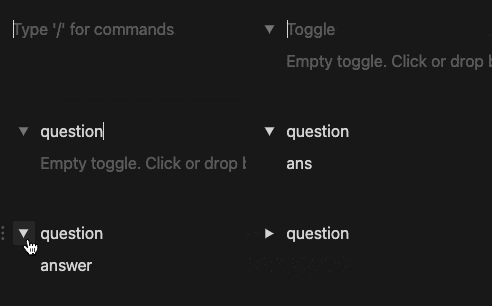
Now, let’s create a flashcard using a Notion toggle.
Create a toggle by starting with a ”>” character.
That is the easiest way. You can also use ”/” or ”+” on mobile and find “Toggle List”.
Put the question as the toggle and the answer as content under the toggle 👀 👇
💡 Tip
The answer can have multiple blocks, images, lists, code blocks, and LaTeX.
So real-life flashcards could look like this 👇
How to reset the latest commit as untracked?
git reset HEAD^How many people die from snake bites annually?
Around 81,000 to 138,000 people die each year

Done. We have a flashcard 👍
Important: The toggles need to be at the top level of the page. They cannot be nested under other blocks — otherwise NeuraCache won’t be able to find them.
STEP 3: Connect your page to NeuraCache
Use this quick tutorial to connect your page 👉 How to Connect Page/Database
STEP 4: Observe the page from the NeuraCache app
Now that we have connected a page with the NeuraCache integration — let’s sync it from the NeuraCache app.
- Open the NeuraCache app
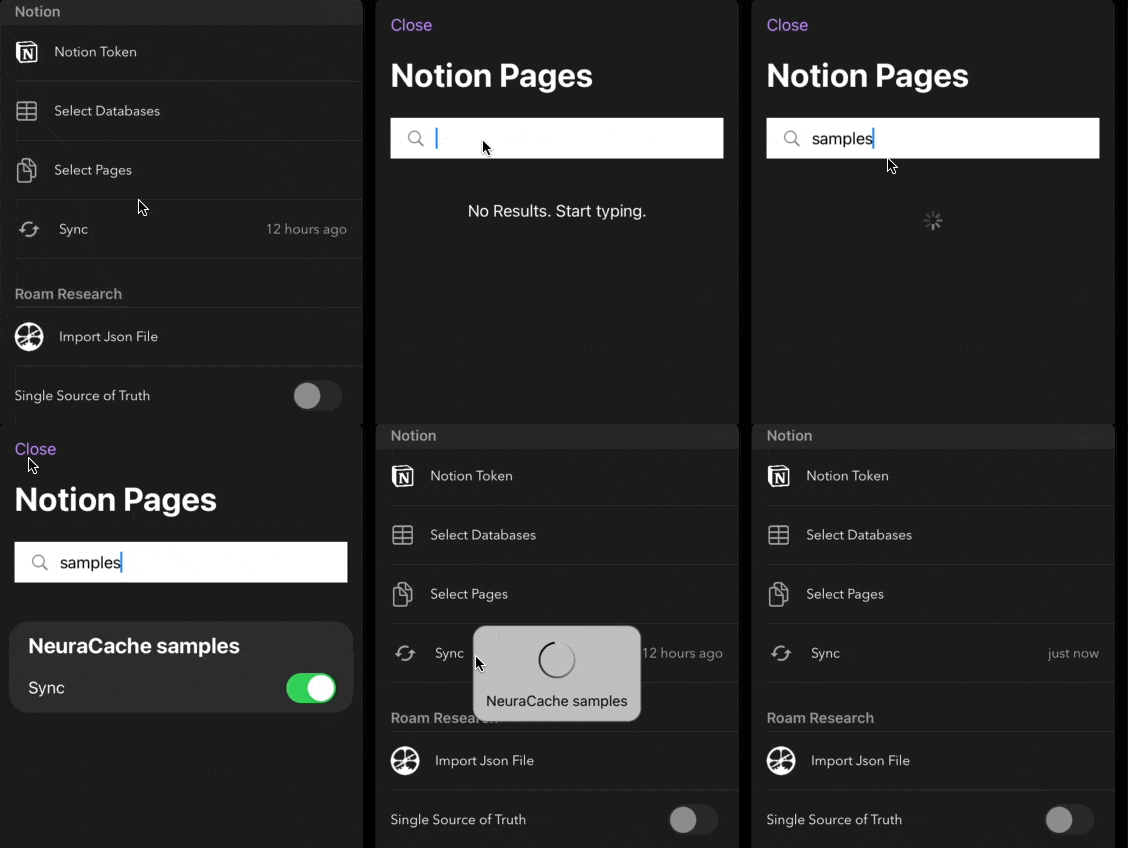
- On the “Cards” tab, tap “Sources”, then “Notion”, then “Select Pages”
- Search for the “NeuraCache Samples” page (or the name you used)
- Turn on Observe for it
- Close the selector and tap the “Sync” button at the top of the “Cards” tab
All Done 👌
You can review your cards using the “Today’s Queue” or the “Decks” tab.
The cards will come back to you automatically using the spaced repetition algorithm. NeuraCache will reflect changes (new/updated/deleted toggles) after the next sync.
💡
- To pick up changes, tap the “Sync” button at the top of the “Cards” tab. The cards will be added to your “Today’s Queue” automatically.
- On the Mac it also syncs by itself: when the app becomes active, and every 30 minutes while it is open.
- On Android it also syncs in the background about every 6 hours, when Android allows it.